Last checked: June 10, 2026
FPS Flick Codes & Free Robux Guide (2026) -- Snipers, Ranked Mode & Pro Tips
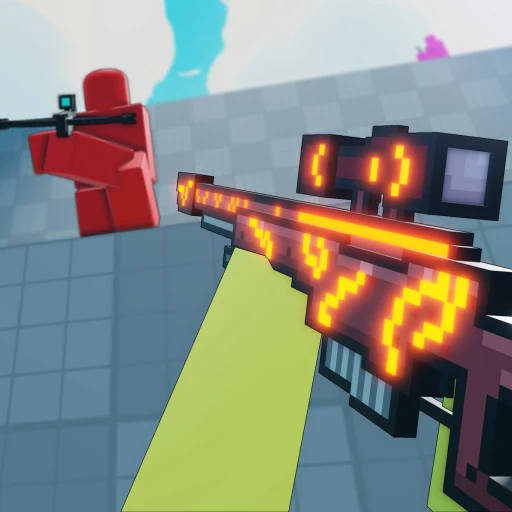
FPS Flick is a fast-paced sniper arena on Roblox where every player spawns with a scoped rifle and one objective -- eliminate everyone else. With roughly 5,800 concurrent players and growing, the game has carved out a serious niche in the competitive FPS space on the platform. This guide covers everything you need to know: current code status, weapon unlocks, ranked strategy, sensitivity settings, and practical tips for dominating on PC, mobile, and controller.
Table of Contents
- What Is FPS Flick?
- FPS Flick Codes Status (2026)
- Sniper Unlock Guide -- Every Weapon Ranked
- Melee Weapons -- Knives vs. Katanas
- Ranked Mode -- How to Climb in 2026
- Sensitivity & Aim Settings by Platform
- 7 Steps to Improve Your Aim
- PC vs. Mobile vs. Controller Comparison
- How to Earn Free Robux for FPS Flick
- Frequently Asked Questions
What Is FPS Flick?
FPS Flick is a free-for-all sniper arena where every player starts with a scoped rifle and fights to top the leaderboard. The game strips away the complexity of loadout shooters and focuses on one thing -- raw aiming skill.
Unlike most Roblox FPS games that give you automatic weapons and spray patterns to memorize, FPS Flick forces precision. Every engagement is a one-shot-or-die situation. You scope in, flick to the target, and either land the headshot or get picked off by someone faster. That core loop is what makes the game so addicting and why the player count has been climbing steadily throughout 2026.
The game is currently in beta, which means new features, weapons, and maps are being added on a regular basis. The developer has been actively updating the experience, with recent patches improving hit registration, adding new sniper models, and refining the ranked matchmaking system. Even in its beta state, FPS Flick runs smoothly and the core gunplay feels tight -- something many full-release Roblox shooters struggle to achieve.
Matches are fast. A typical round lasts around 5 minutes, with 12 players fighting across compact arena maps designed for sniper combat. There are elevated platforms, long sightlines, and tight corridors that force close-range engagements where melee weapons become essential. The map design rewards players who learn spawn points and positioning, not just those with the fastest reaction time.
You can play FPS Flick on Roblox right now on PC, mobile, or with a controller. It is completely free to join, though premium cosmetic items and certain weapon skins may require Robux.

FPS Flick Codes Status (2026)
FPS Flick does not have a codes system as of July 2026. The game is still in beta, and the developer has not implemented a code redemption feature yet.
This is common for Roblox games in early development. Many popular titles -- including games like Anime Training RNG and Anime Blade Clicker -- added their code systems weeks or months after initial launch, often tying them to milestone celebrations or social media follower goals.
Here is what to watch for regarding future FPS Flick codes:
- Player milestone codes -- When the game hits major player counts (10K, 50K, 100K concurrent), developers often release celebration codes with free currency or exclusive skins.
- Social media codes -- Follow the developer's Twitter/X and join the official Discord if one exists. These are the first places codes get announced.
- Update codes -- Major patches and content drops frequently come with a promotional code to bring players back.
- Holiday event codes -- Seasonal events in Roblox games almost always include limited-time codes.
We will update this section the moment a codes system goes live. For now, the best way to earn in-game currency is through match performance -- kills, headshots, and match wins all award credits that can be spent on new weapons and cosmetics.
Sniper Unlock Guide -- Every Weapon Ranked in 2026
FPS Flick features multiple unlockable sniper rifles, each with different handling characteristics. The starter sniper is solid, but higher-tier rifles offer faster scope-in speed, better accuracy recovery, and unique visual effects.
Understanding the differences between snipers matters more than you might think. While every rifle is a one-shot headshot kill, body shots vary in damage, and the scope-in speed directly affects your ability to win peek duels. Here is how the current weapon progression works:
Starter Snipers
Every new player begins with the default bolt-action rifle. It has moderate scope-in speed and standard damage. The reticle is clean with no visual clutter, making it a reliable choice even for experienced players. Many top-ranked players still use the default because they have built muscle memory around its specific scope timing.
The default rifle rewards patience. Its scope-in animation takes slightly longer than premium options, so you need to pre-aim common angles rather than relying on raw reaction speed. If you are learning the game, spend your first 20-30 matches with this weapon before thinking about upgrades.
Mid-Tier Snipers
After accumulating enough in-game currency from match rewards, you can unlock mid-tier snipers that offer faster scope-in times and tighter accuracy recovery after firing. These weapons are noticeable upgrades for aggressive players who push fights rather than hold angles.
The mid-tier rifles typically cost between 2,000-5,000 in-game credits. At an average earn rate of 100-200 credits per match (depending on performance), expect to grind for 15-30 matches to unlock your first upgrade. Prioritize the sniper with the fastest scope-in speed if you play aggressively, or the one with the best accuracy recovery if you prefer holding long angles and double-peeking.
Premium Snipers
The highest-tier snipers either require significant in-game grinding or Robux purchases. These weapons have the fastest handling stats and come with exclusive visual effects -- tracer rounds, custom scope overlays, and kill effects. While the stat advantages are real, they are not game-breaking. A skilled player with the starter rifle will still outperform someone with a premium weapon and poor aim.
If you do plan to invest Robux into FPS Flick, prioritize snipers with faster scope-in speed over cosmetic-only skins. The competitive advantage from a 10-15% faster scope animation is significant in ranked matches where duels are decided by fractions of a second.
Melee Weapons -- Knives vs. Katanas in 2026
Melee weapons in FPS Flick serve a critical role -- they are your best option when an enemy gets within close range where scoping becomes impractical.
| Attribute | Knives | Katanas |
|---|---|---|
| Swing Speed | Fast (0.3s) | Medium (0.5s) |
| Damage | 60-75 per hit | 85-100 per hit |
| Range | Short (5 studs) | Medium (8 studs) |
| Swing Arc | Narrow | Wide |
| Best For | Quick trades, escapes | Multi-target, ambushes |
| Hits to Kill | 2 | 1-2 |
Knives are the better choice for most situations. Their faster swing speed means you can get two hits off before a katana user finishes their first swing. In a 1v1 melee fight, the knife user wins if both players start swinging at the same time.
Katanas shine in specific scenarios. If you can land a backstab or catch an enemy off guard, the higher damage means you can one-shot players who have already taken a body hit from a sniper. The wider swing arc also makes katanas better for fighting multiple opponents in tight spaces -- one swing can clip two enemies standing close together.
The practical advice: equip a knife for ranked matches where 1v1 engagements are most common. Save the katana for casual lobbies where chaotic multi-player fights happen more frequently.
Ranked Mode -- How to Climb in 2026
Ranked mode in FPS Flick uses a points-based system where kills, headshots, and match placement all contribute to your rank. Dying subtracts a smaller number of points, so maintaining a positive K/D ratio is the simplest path to climbing.
The ranked system pairs you against players of similar skill level, which means the competition gets harder as you climb. Matches at higher ranks feel noticeably different -- players hold angles more carefully, movement is more deliberate, and every peek is calculated.
Ranked Progression Tips
Consistency matters more than highlight-reel plays. A player who goes 8-3 every match will climb faster than someone who alternates between 15-1 and 2-10. The ranking algorithm rewards stable performance because it reduces your uncertainty rating faster, which amplifies your point gains.
Headshots award bonus ranked points, so prioritize accuracy over speed. It is better to take an extra 200 milliseconds to line up a headshot than to rush a body shot. Over a full match, the cumulative point difference from headshot bonuses is substantial.
Play during consistent time windows. Ranked matchmaking draws from the active player pool, and playing at the same time each day means you face similar opponents. You start recognizing play styles, common positions, and tendencies, which gives you a subtle but real edge.
Sensitivity & Aim Settings by Platform in 2026
Your sensitivity settings have a bigger impact on performance in FPS Flick than in almost any other Roblox game. Since every kill requires precise aim with a scoped rifle, finding the right sensitivity is not optional -- it is the foundation of improvement.
PC Mouse Settings
For mouse players, lower sensitivity is almost always better in a sniper-focused game. Start with your in-game sensitivity between 0.3 and 0.5. You want to be able to make a full 180-degree turn with a comfortable arm swipe, but not so sensitive that small hand tremors throw off your crosshair.
If you are coming from games like Arsenal or Bad Business where you used higher sensitivity for tracking automatic weapons, cut your FPS Flick sensitivity by 30-40%. Sniper flicks require controlled, deliberate mouse movements -- not the fast, loose wrist aiming that works with spray weapons.
Make sure mouse acceleration is turned off in both your operating system settings and within Roblox. Mouse acceleration makes your cursor move faster when you move the mouse quickly, which destroys the muscle memory you need for consistent flick shots.
Mobile Touch Settings
Mobile players should set their sensitivity between 40-60%. The goal is to find a sweet spot where you can flick to nearby targets without overshooting, while still being able to turn quickly enough to react to enemies behind you.
FPS Flick includes a light aim-assist system for mobile that helps compensate for the precision gap versus mouse users. The assist provides subtle tracking support when your crosshair is near an opponent, but it will not lock onto targets for you. Use it as a safety net, not a crutch -- you still need to get your crosshair close to the target before the assist activates.
Consider using a two-finger claw grip for mobile. Your right thumb controls aiming and firing, while your left thumb handles movement. This setup gives you simultaneous control over movement and aim, which is essential for strafing while shooting.
Controller Settings
Controller players should keep stick sensitivity low -- around 3-4 on a 1-10 scale. Increase the aim-down-sights (ADS) sensitivity multiplier slightly to compensate, since you will spend most of your time scoped in.
Controller aim assist in FPS Flick is slightly stronger than mobile aim assist, which helps bridge the gap with mouse players. Focus on pre-aiming common angles so you need minimal stick movement to land your shots. Controller excels at holding positions where enemies walk into your crosshair, rather than chasing flick shots across the screen.
7 Steps to Improve Your Aim in FPS Flick (2026)
Improving at FPS Flick is straightforward if you approach practice deliberately. Follow these steps in order -- each one builds on the previous.
- Adjust your sensitivity settings using the recommendations above. Lower is better for sniping. Spend 10 minutes in a casual match testing the feel before locking in your settings.
- Play 3-5 casual warm-up matches before entering ranked. Focus exclusively on hitting headshots -- ignore your K/D during warm-up. The goal is to calibrate your aim, not to win.
- Learn every spawn point on each map. Knowing where enemies appear after dying lets you pre-aim those positions and get free kills in the first 1-2 seconds after a respawn wave.
- Practice the flick technique deliberately. Snap your crosshair to targets instead of slowly tracking them. Start with large, obvious flicks and gradually reduce the distance as your muscle memory improves.
- Move constantly between shots. Strafe left and right, use jump peeks to spot enemies, and reposition after every 2-3 kills. Standing still makes you an easy target for better players.
- Switch to your knife or katana when enemies are within 10 studs. Re-scoping at point-blank range is slower than a melee swing, and missing a close-range scope shot usually means death.
- Play ranked matches consistently -- aim for at least 5 per session. Ranked opponents force you to improve because they punish bad habits that casual players let you get away with.
The Key Takeaway
Raw flick speed is the most important skill in FPS Flick, but it is built on a foundation of proper settings, map knowledge, and positioning. Do not skip the fundamentals chasing highlight plays.
PC vs. Mobile vs. Controller -- Platform Comparison (2026)
All three platforms can compete in FPS Flick, but they each have distinct strengths and weaknesses. Here is an honest breakdown.
| Factor | PC (Mouse) | Mobile | Controller |
|---|---|---|---|
| Precision | Highest | Lowest | Medium |
| Flick Speed | Fastest | Medium | Slowest |
| Aim Assist | None | Light | Moderate |
| Movement Control | WASD -- precise | Joystick -- limited | Stick -- smooth |
| Portability | Low | Highest | Medium |
| Ranked Viability | Best | Challenging | Competitive |
| Frame Rate | 60+ FPS | 30-60 FPS | Varies |
PC players have the clear advantage in a game built around sniper precision. Mouse input allows for exact crosshair placement and fast flick shots that sticks and touchscreens struggle to replicate. If you are serious about climbing ranked, PC is the optimal platform.
Mobile is viable for casual play and lower-ranked matches, but you will hit a ceiling in ranked where mouse precision starts to dominate. The aim assist helps, but it cannot fully compensate for the inherent limitations of touch input in a one-shot-kill sniper game.
Controller sits in the middle. The aim assist is stronger than mobile, and stick input provides smoother movement than touch, but flick speed is limited by maximum stick deflection. Controller players who pre-aim angles and play a patient, positional style can compete at high ranks.
How to Earn Free Robux for FPS Flick
While FPS Flick is free to play, premium weapon skins and cosmetic upgrades require Robux. If you want to customize your loadout without spending money, Earnaldo offers a way to earn free Robux through simple tasks like watching videos, completing surveys, and downloading apps. Those Robux can then be used to grab premium snipers, exclusive knife skins, or any other Robux-priced item in FPS Flick.
Earn Free Robux for FPS Flick
Get premium weapon skins and cosmetic upgrades without spending your own money. Earn Robux through Earnaldo and spend them in FPS Flick.
Frequently Asked Questions About FPS Flick (2026)
FPS Flick does not currently have a codes system implemented. The game is still in beta, and the developers have not added a code redemption feature yet. This is normal for early-access Roblox games -- codes typically arrive alongside major updates or milestone celebrations. We will update this guide as soon as codes become available.
FPS Flick is available on PC, mobile devices (iOS and Android), and supports controller input. The game adapts its controls and UI for each platform. PC players generally have a precision advantage with mouse aiming, but aim assist on mobile and controller helps bridge the gap.
New snipers are unlocked by earning in-game currency through matches. Each kill, headshot, and match completion awards credits that can be spent in the weapon shop. Higher-tier snipers cost more credits and some require a minimum rank in ranked mode before they become available for purchase.
Yes. FPS Flick is completely free to play on Roblox. You can join matches, earn in-game currency, and unlock weapons without spending any Robux. Premium cosmetic skins, weapon finishes, and certain visual effects may require Robux, but they do not provide meaningful gameplay advantages over earned weapons.
Ranked mode is a competitive playlist where your performance directly affects your visible rank. Kills, headshots, match placement, and accuracy all factor into your ranking points. Wins add points while deaths subtract a smaller amount. Ranked matches use stricter matchmaking to pair you with players at a similar skill level, making each match more competitive than casual lobbies.
FPS Flick includes a light aim-assist system for mobile and controller to help compensate for the precision gap versus mouse users. The assist provides subtle tracking support when your crosshair is near an opponent, but it does not auto-lock or snap to targets. Controller aim assist is slightly stronger than mobile aim assist. Both can be adjusted or disabled in the settings menu.
FPS Flick features two categories of melee weapons: knives and katanas. Knives swing faster with shorter range, requiring two hits to eliminate a full-health opponent. Katanas deal more damage with a wider swing arc and can one-shot players who have already taken sniper body damage. Both types have multiple cosmetic variants that can be unlocked through gameplay or purchased with Robux.
FPS Flick matches are free-for-all arenas that host up to 12 players per server. With around 5,800 concurrent players during peak hours, queue times are short and servers fill up quickly. The 12-player count keeps matches intense without creating spawn-camping issues common in larger lobbies.
Related Guides
Anime Training RNG -- Free Robux & Codes Guide
All active codes, training strategies, and RNG mechanics explained for 2026.
GuideAnime Blade Clicker -- Free Robux & Codes Guide
Complete blade progression, active codes, and tips for climbing the leaderboard.
GuideAnime Rifts -- Free Robux & Codes Guide
All working codes, rift strategies, and character tier lists updated for 2026.