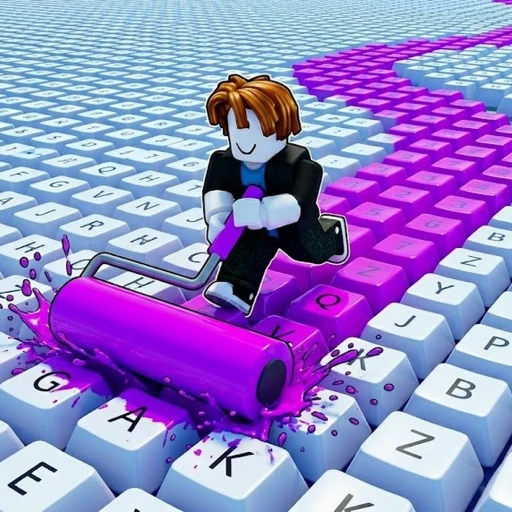
Paint My Keyboard Free Robux Guide (2026) — Cash, Rollers & Tips
Paint My Keyboard takes one tiny, satisfying action — rolling paint across keyboard keys — and turns it into a full cash loop. You paint keys, collect the cash they pay out, buy better paints, upgrade your roller, and keep expanding your keyboard until it sprawls across the room. There is no combat and no timer; it is a relaxing idle-style painter built to run while you do other things. This guide covers how the loop works, the smartest order to spend your cash, how to expand efficiently, the group boost, the honest code situation, and how to earn free Robux for cosmetics.
In This Guide
What Is Paint My Keyboard on Roblox in 2026?
Paint My Keyboard is a relaxing painting and cash sim made by the Roblox group sooo satisfying!, built around one oddly satisfying idea: rolling fresh paint across a giant keyboard. You play it at place ID 75738770295234, and it is free to join. The whole hook is in the name — you paint colorful keys, the keys pay out cash, and you pour that cash back into bigger, faster, more valuable painting.
This is not a grind-heavy battle game. There are no enemies, no obby falls, and no timers ticking down. Instead you get a calm, self-paced loop that runs happily in the background while you watch something on a second screen. That low-pressure design is exactly why it took off so fast in 2026.
The numbers back that up. Created on May 28, 2026 and updated as recently as June 24, the game holds about 12,975 concurrent players, over 3.9 million visits, and a 97.9% rating (28,191 likes against just 594 dislikes) in under a month. That kind of like ratio is rare, and it tells you the loop genuinely satisfies. If you like other simple viral 2026 hits, see how it stacks up in our Paint My Keyboard vs Sell Lemons comparison.
How to Play and Earn Cash
The core loop is short: paint keys, collect cash, reinvest. When you spawn in, you control a paint roller and a starter keyboard. Move the roller across the keys to coat them in paint, and each painted key pays out cash you can spend at the shop.
Cash is the only currency that matters early. The more keys you cover and the better your paint, the more each pass is worth. Because there is no penalty for slow play, you can treat it as an idle earner: paint a stretch, bank the cash, and keep the roller moving. The keyboard refreshes so there is always more to paint.
Everything you buy feeds back into that single loop. Better paint raises the value of every key you coat. A better roller covers more keys per pass. Expanding the keyboard adds more keys to paint in the first place. Get all three climbing together and your cash-per-minute snowballs.
Rollers, Paints and Expanding Your Keyboard
Three upgrade tracks drive your whole run, and they each do a different job. Understanding what each one actually buys you is the difference between a keyboard that crawls and one that prints cash.
Better Paints
Unlocking better paints raises the cash value of each painted key. This is your multiplier — the same roller stroke is simply worth more once you move up a paint tier. Whenever a new paint is affordable and clearly outvalues your current one, it is almost always the strongest buy.
Roller Upgrades
Upgrading your roller widens your coverage so you paint more keys with every pass. Think of it as your throughput: paints decide how much each key is worth, the roller decides how many keys you hit per second. A wide roller on cheap paint underperforms, and so does premium paint on a tiny roller, so you want both rising together.
Expanding the Keyboard
Expanding adds more keys to your board, which raises the ceiling on a single painting run. A bigger keyboard means longer uninterrupted painting before you have to reposition, and more total cash banked per loop. The end goal the game sets is simple: build the biggest keyboard you can.
Maximizing Cash Per Run
Your cash-per-minute is just paint value times keys painted per pass times how much board you have to cover. To push it up, keep all three of those numbers climbing instead of dumping everything into one.
The most common trap is over-expanding before your paint and roller can keep up. A huge keyboard you can only coat in cheap paint earns less than a smaller board with strong paint and a fast roller. Grow the board to match your painting power, not ahead of it.
Best Order to Spend Your Cash
There is a clean priority that works for almost any new player. Follow it and you avoid the dead ends that slow people down.
- Buy the next paint tier first. A paint upgrade lifts the value of every key at once, so it pays back the fastest.
- Upgrade the roller second. Once your paint is worth more, a wider roller multiplies that value across more keys per pass.
- Expand the keyboard third. Only grow the board once your paint and roller can actually cover it; expanding too early just spreads weak earnings thinner.
- Join the group for the boost. The game offers a boost for joining the creator group, which is free value you should grab on day one.
- Repeat the cycle. Paint, bank, buy the next paint, then the next roller, then the next expansion, and keep the snowball rolling.
Common Mistakes New Players Make
The biggest mistake is hoarding cash. This is an idle painter, not a saving game; cash sitting in your pocket earns nothing, while a paint upgrade you bought ten minutes ago is still paying you back. Spend as soon as a clear upgrade is affordable.
The second mistake is expanding the keyboard too fast. A board bigger than your paint and roller can handle looks impressive but earns slowly, because most of those new keys are coated in cheap paint. Match expansion to your painting power.
A close third is ignoring the group boost. It is a one-time, free multiplier that you should claim early rather than leaving on the table. And as always, never trust a link promising a "free Robux generator" for the game — those are always scams.
Tips for Faster Progress
Prioritize paint value. When in doubt, the paint tier is the upgrade that lifts your whole income at once.
Keep the roller busy. Uptime beats bursts — let it paint while you multitask and bank the cash when you return.
Balance the three tracks. Paint, roller, and board size should rise together; a lopsided build always underperforms.
Grab the group boost early. It is free, permanent value, so claim it before your first real upgrade push.
Reinvest immediately. Idle cash is wasted cash; spend it the moment a meaningful upgrade is in reach.
Paint My Keyboard Codes (July 2026)
There are no confirmed Paint My Keyboard codes as of July 2026. The game does not have a verified public redeem box, and no reputable code site lists working codes for it. The closest thing to free value is the boost you get for joining the sooo satisfying! group, which is not a code but is worth grabbing.
For the full breakdown and the honest code status, see our Paint My Keyboard codes page.
How to Earn Free Robux for Paint My Keyboard
Paint My Keyboard is free to play, and you never need to spend to enjoy the painting loop. If you want Robux for optional cosmetics here or game passes in other Roblox games, you can earn it through Earnaldo and put it toward exactly what you want. It is the safe route — never use a "free Robux generator" or hand over your password, because those are always scams.
Earn Free Robux While You Play
Want Robux for Paint My Keyboard or other Roblox games? Earnaldo lets you earn free Robux by completing simple tasks — no survey spam, no downloads, just real rewards.
Frequently Asked Questions
Paint My Keyboard is a relaxing painting and cash sim by the group sooo satisfying!, played at place ID 75738770295234. You roll paint across keyboard keys, collect cash from each painted key, then buy better paints, upgrade your roller, and expand your keyboard. As of June 24, 2026 it has about 12,975 concurrent players, over 3.9 million visits, and a 97.9% rating.
You earn cash by painting keys with your roller. Each painted key pays out, and better paint tiers raise how much every key is worth. Spend that cash on better paints, a wider roller, and a bigger keyboard, then keep painting to snowball your income.
Buy the next paint tier first, because it lifts the value of every key at once. Upgrade your roller second to paint more keys per pass, then expand the keyboard third once your paint and roller can cover it. Keep all three climbing together.
No. As of June 2026 there is no confirmed public code or redeem system in Paint My Keyboard, and no reputable code site lists working codes. The only free boost is for joining the creator group. If a real code system launches we will add it to our Paint My Keyboard codes page.
Yes. Paint My Keyboard is free on Roblox at place ID 75738770295234. Any purchases are optional, and nothing is required to paint, earn cash, or expand your keyboard.
It plays well as a low-effort idle painter. Because there is no timer or penalty, you can keep the roller moving while you do something else, then check back to bank cash and buy the next upgrade. Uptime matters more than short bursts.
It pairs an oddly satisfying action with a tight cash loop and a calm, no-pressure design. Created on May 28, 2026, it climbed to about 12,975 concurrent players and 3.9 million visits in under a month, with a standout 97.9% like ratio that shows the loop genuinely satisfies.
About This Guide
This guide was last updated on June 24, 2026 and reflects the current state of Paint My Keyboard. For the full cluster, visit our Paint My Keyboard hub or the codes page for the honest code status. If you like simple viral earners, compare it in Paint My Keyboard vs Sell Lemons, or try a relaxing climb with our ASMR Tower guide. You can also play it directly on Roblox. Spot something out of date? Let us know in the Earnaldo Discord.