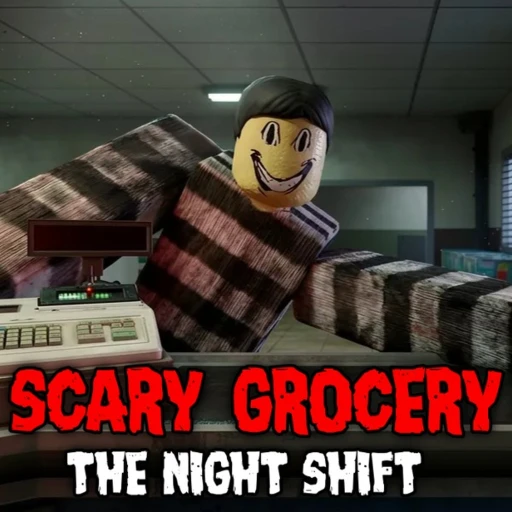
Scary Grocery: The Night Shift Beginner Guide (2026) — How to Survive
Scary Grocery: The Night Shift is a co-op horror job sim on Roblox where you work the register at a late-night store. By the numbers it looks like an ordinary retail shift, but every customer could be a demonic doppelganger wearing a human face, and one slip turns your quiet store into a hunting ground.
This guide covers your first shift, how to read the register, how to catch a doppelganger before you serve it, how to survive The Entity when you don't, and how to hit your quota every night up to the 20-night win. For codes, comparisons, and everything else, our Scary Grocery: The Night Shift hub ties it all together.
The game comes from Moo Milk Studio and has grown fast since its November 22, 2025 launch. It has passed 90.3 million visits with about 238,900 favorites and roughly 4,900 players in-game as of August 6, 2026, holding a strong 87.6% like rating across 41,000-plus votes. Roblox files it under Survival, and servers hold up to 30 players, so you'll often be clocking in alongside other night-shift workers.
Table of Contents
Your First Shift
When you load in, you're hired as a new night-shift worker at The Store, and the opening shift doubles as the tutorial. The loop is simple on paper: customers walk up to the register, you scan them, verify who they are, and either check them out or deal with them. Between customers you clean up messes, restock shelves, and spend money at the shop. Don't rush the first night. Learn where the register, the shopping terminal, and the front door sit before the pressure ramps up.
Here's how a standard register interaction runs once you're clocked in:
- Wait for a customer to approach the counter, then start the scan to bring their details up on your register screen.
- Read the info shown on screen — name, age, job, and location — and treat it as the customer's claimed identity.
- Use the on-register question buttons, such as the age prompt, to make the customer state their answers out loud so you can compare them against the screen.
- If every answer lines up and the customer looks normal, complete the checkout to serve them and bank the sale toward your quota.
- If the details contradict each other or the customer looks wrong, treat it as a doppelganger and shoot it instead of serving it.
- After a dispatch, toss the body out of the store, mop any mess, and restock any shelves the shift has run down.
That rhythm — verify, serve or shoot, clean up, restock — is the whole job, and it repeats all night. The faster you get comfortable with it, the more spare time you'll have to earn money and prepare for what happens when things go wrong. If you want the wider picture on progression and store layout, the hub collects every guide we've written.
How to Spot a Demonic Customer
Verification is the heart of the game, and it's where beginners fail most. Every customer arrives claiming to be an ordinary human, and the register hands you the tools to test that claim. The details on your screen — name, age, job, and location — are the story the customer wants you to believe. Your job is to poke holes in it before you hit checkout.
Start with the on-register questions. Prompts like the age button push the customer to state their answer, which you then compare against the ID data on screen. A genuine human's spoken answers match their listed details. A doppelganger's story tends to slip — an age that doesn't match the ID, or a detail that contradicts what the screen shows. Any mismatch between what they say and what their info claims is your red flag.
Looks matter too. Doppelgangers are demonic customers wearing a human disguise, and that disguise isn't always perfect. If a customer looks physically off or unsettling in a way a normal shopper wouldn't, weigh that alongside the answers before you decide. When a customer clears both checks, you serve them. When they fail, you shoot rather than checkout, because a served doppelganger is the single mistake the whole game punishes hardest.
Surviving The Entity
Serve a doppelganger by mistake and you trigger the game's boss fight: The Entity. It doesn't arrive instantly. You get roughly a 30-second warning window before it appears inside the store, and how you spend those seconds decides whether you live. This is why keeping spare money on hand matters — that half-minute is your one chance to arm up.
Spend the window at the shopping terminal grabbing a gun if you don't already have one, plus Medkits and Traps. Medkits heal you and, crucially, revive a teammate who goes down, so a co-op run doesn't end the moment one worker falls. Traps are placed defensively to slow or wear down The Entity as it closes in. The Entity typically enters through the front door, so back away from that entrance during your prep to buy yourself room to move and react.
Once it arrives, keep shooting. The fight is a damage race: pour fire into The Entity until you've hurt it enough, and it retreats rather than dying outright. Stay mobile, use your Traps to cover the approach, and if a co-op partner drops, revive them with a Medkit before you get overwhelmed. Survive the encounter and you're back to the register — shaken, down some cash, but still employed.
Hitting Your Quota Every Night
Each night you have to meet a quota to keep your job, and money is how you get there. You earn it by serving real customers cleanly at the register, so smooth, correct checkouts are your income engine. Miss the quota and you're out, so treat every legitimate human as money you can't afford to turn away.
Around the register work, you keep the store running. Toss out the bodies of doppelgangers you've dispatched, mop up messes so the place stays clean, and restock shelves as they empty — each restock costs a small fee, around $5, so budget for it. These chores aren't busywork; a store that's clean and stocked keeps the shift flowing and keeps customers coming to your counter.
Whatever you earn over the nightly quota stays in your pocket, and that surplus is your survival fund. Spend it at the shopping terminal, which sits directly opposite the register, on the gun, Medkits, and Traps you'll want when a night goes sideways. Balancing the two — earning enough to clear quota while stashing enough to survive The Entity — is the real skill curve here. Clear 20 nights and you win the run. If you're chasing extra Robux for cosmetics along the way, our free Robux guide covers the legitimate routes, and there are no gameplay codes to redeem — our codes page tracks that status so you don't waste time on fake lists.
Beginner Mistakes to Avoid
Most early losses trace back to a handful of habits. Fix these and your survival rate climbs fast.
1. Checking out without verifying. The checkout button is the trap. Never serve a customer until their spoken answers match the screen — a rushed sale to a doppelganger is what summons The Entity.
2. Playing without a gun. You can't dispatch a doppelganger or fight the boss unarmed. Buy the gun early and keep it.
3. Ignoring the 30-second window. When the boss warning hits, that half-minute is for buying Medkits and Traps and repositioning — not for freezing.
4. Spending everything and saving nothing. If you blow your whole balance, you'll have no cash for the emergency Medkit or gun you need when The Entity spawns.
5. Letting the store fall apart. Skipping cleanup and restocking chokes your income and slows the shift. Keep shelves full and messes mopped.
6. Fighting The Entity by the front door. It usually enters there, so parking next to the entrance gives you no room to react. Back off before it arrives.
7. Leaving teammates down. In co-op, a fallen worker is a lost gun in the fight. Revive them with a Medkit as soon as it's safe.
Earn Free Robux While You Play
Want more Robux for Scary Grocery: The Night Shift and other Roblox games? Earnaldo lets you earn free Robux by completing simple tasks — no surveys, no downloads, just real rewards.
FAQ
You survive by doing your job correctly every night. Scan and verify each customer at the register, checkout the real humans, and shoot the doppelgangers before they slip past you. Keep the store clean and the shelves stocked, meet your nightly quota so you keep your job, and spend leftover money on a gun, Medkits, and Traps from the shopping terminal. If a doppelganger does get through, The Entity appears within about 30 seconds, so use that window to arm up and fight it off. Clear 20 nights to win.
Scan the customer at the register and cross-check the details on your screen — name, age, job, and location — against what they actually say. Use the on-register question buttons, such as the age prompt, to make them state their answers, and watch for anything that does not match their ID or looks physically off. A human whose answers line up gets a normal checkout. A customer whose story contradicts the ID, or who looks wrong, is a doppelganger, and you deal with it by shooting rather than serving it.
Medkits and Traps are survival items you buy from the in-store shopping terminal, mainly to prepare for The Entity boss fight that triggers when a doppelganger gets served. Medkits heal you and can revive a downed co-op teammate so your run does not end. Traps are placed defensively to slow or damage The Entity as it moves in from the front door. Alongside the gun, they are what you spend leftover quota money on during a shift so you are ready when the boss shows up.
More Scary Grocery: The Night Shift
Keep reading across our Scary Grocery: The Night Shift coverage:
- Scary Grocery: The Night Shift Hub — every guide, update, and stat in one place.
- Scary Grocery: The Night Shift Codes — the current code status and what to ignore.
- Scary Grocery: The Night Shift Free Robux Guide — legit ways to fund your cosmetics.
- Scary Grocery: The Night Shift vs 99 Nights in the Forest — which survival-horror grind fits you.
Into the wider horror shelf? Try the register-and-serve panic of Scary Shawarma Kiosk, the door-by-door dread of DOORS, or the wilderness survival of 99 Nights in the Forest. You can confirm live details on the official Roblox game page or check population stats on Rolimon's.