Last checked: June 10, 2026
Cook and Sell Free Robux Guide (2026) — Tips, Codes & Strategies
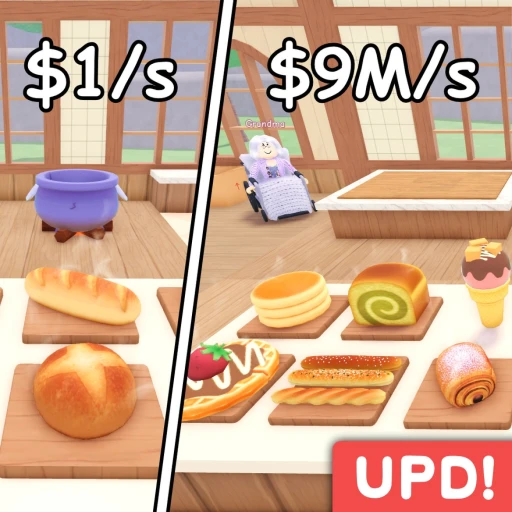
Cook and Sell (also written Cook & Sell) is a tycoon/cooking simulator on Roblox where you buy ingredients, cook dishes in a pot, stock your shop shelves, and serve customers to earn cash. Built by Alpaca Games and launched November 12, 2025, the game has already pulled in over 14 million visits with a 96% approval rating — and it's still in ALPHA. That means new recipes, appliances, and features are landing regularly.
This guide covers the full gameplay loop, every working code, the goal-based progression system, the recipe pity mechanic, money-making strategies, and what's coming next. We'll also briefly mention how Earnaldo can help you earn free Robux for optional dev products, but the focus here is on the game itself.
Table of Contents
- Cook and Sell Overview — Game Stats and Core Loop in 2026
- Beginner Guide — Your First 20 Minutes
- Goal System and Recipe Progression in 2026
- Recipe and Ingredient Strategy
- Best Money-Making Strategies in 2026
- All Active Cook and Sell Codes (July 2026)
- Upcoming Features and Roadmap for 2026
- Cook and Sell vs Other Roblox Cooking Games in 2026
- Earning Free Robux While Playing Cook and Sell
- Frequently Asked Questions
1. Cook and Sell Overview — Game Stats and Core Loop in 2026
Cook and Sell is a hands-on tycoon where every step of running your food shop requires active participation. You aren't clicking a button and watching money roll in — you're physically buying ingredients from a supplier, dropping them into a pot, waiting for the dish to cook, carrying finished items to your shelves, and watching customers browse and buy. The tactile loop is what sets it apart from passive tycoon games on Roblox.
The game was built by Alpaca Games and entered ALPHA on November 12, 2025. Despite its early access status, it consistently pulls between 3,000 and 10,000 concurrent players during peak hours. Here's a snapshot of where the game stands right now:
| Detail | Value |
|---|---|
| Full Title | Cook & Sell |
| Developer | Alpaca Games |
| Genre | Tycoon / Cooking Simulator |
| Place ID | 106131416903029 |
| Released | November 12, 2025 |
| Core Appliance | Cooking Pot (more coming soon) |
| Max Items Per Customer | 5 |
| Monetization | Dev products (no required game passes) |
The core gameplay loop breaks down into five repeating steps: buy ingredients, cook in the pot, stock your shelves, serve customers, and spend your earnings on upgrades and new ingredients. Every cycle feeds the next, and the entire economy scales as you unlock more recipes and attract higher-spending customers. You can play Cook and Sell here: Cook & Sell on Roblox.
2. Beginner Guide — Your First 20 Minutes in Cook and Sell
New players sometimes feel unsure about what to do first because Cook and Sell doesn't hold your hand through a lengthy tutorial. The good news is that the opening loop is straightforward once you know the order of operations. Here's exactly how to spend your first 20 minutes.
Step 1: Buy Ingredients
Walk to the ingredient supplier and purchase your starting items. You'll have limited cash at the beginning, so buy only what you can afford. Don't overthink it — grab the cheapest available ingredients and get cooking. You can always upgrade to better ingredients after your first few sales.
Step 2: Cook in the Pot
Head to your cooking pot, which is currently the only appliance in the game. Place your ingredients into the pot and wait for the dish to finish. Each recipe requires specific ingredient combinations, and the game shows you what's needed. Early recipes are simple — they won't require rare or expensive items. Keep the pot active at all times. A pot that isn't cooking is cash you aren't making.
Step 3: Stock Your Shelves
Once a dish finishes, pick it up and place it on one of your shop shelves. This is where most beginners lose time — they cook a dish and then stand around instead of immediately placing it. Move finished items to shelves within seconds of them completing. An empty shelf is a missed sale every time a customer walks past it.
Step 4: Serve Customers and Collect Cash
Customers enter your shop automatically and browse whatever's on your shelves. Here's the key detail most players miss early on: each customer can buy up to 5 different items per visit. That means a shop with only one type of dish stocked will earn a fraction of what a shop with 4-5 different dishes earns. Customer variety is directly tied to your revenue per visit.

Step 5: Reinvest and Upgrade
Take your earnings and immediately reinvest. Buy more ingredients, unlock a new recipe slot, or upgrade your shop. The early game rewards aggressive reinvestment — sitting on a pile of cash doesn't help you. Every dollar spent on ingredients or upgrades generates more income in the next cycle. Get comfortable with being nearly broke after each shopping run.
3. Goal System and Recipe Progression in 2026
Cook and Sell doesn't use a traditional level-up system. Instead, progression is driven by completing in-game goals. Each goal has specific requirements — cook a certain number of dishes, earn a cash target, serve a number of customers — and completing them rewards you with either cash or a new recipe unlock. This system is the engine behind everything.
How Goals Work
You'll see your current active goals displayed in the game UI. Each one tracks a specific metric: total dishes cooked, cash earned, items sold, or other targets. When you hit the threshold, the goal completes and you receive your reward. A new goal immediately replaces the completed one, so there's always something to work toward.
The reward for each goal is either a cash bonus or a new recipe unlock. Cash bonuses are useful for buying ingredients and upgrades, but recipe unlocks are more valuable long-term because they expand your menu and attract higher-spending customers.
The Pity System Explained
This is the mechanic that most players don't know about until they've been playing for a while. Cook and Sell has a built-in pity system: if you receive 4 cash rewards in a row from goal completions, your next goal is guaranteed to unlock a recipe. This prevents frustrating streaks where you're stuck cooking the same 2-3 dishes because RNG keeps handing you cash.
Knowing this changes your mindset. If you've gotten 3 cash rewards in a row, don't worry — you're at most one goal away from a new recipe. Just keep pushing through goals, and the pity system will catch you. This also means that in the worst case, you'll unlock a new recipe at least every 5 goal completions.
Optimizing Goal Completion Speed
The fastest way to complete goals is to keep your pot running constantly and your shelves fully stocked. Most goals revolve around cooking and selling metrics, so maximizing throughput naturally accelerates progression. Don't waste time decorating your shop or rearranging furniture during early progression — focus entirely on the cook-stock-sell cycle until you've unlocked at least 5-6 recipes.
4. Recipe and Ingredient Strategy for Cook and Sell
Your recipe library determines how much each customer spends in your shop. A shop with 2 recipes might earn $10-15 per customer visit, while a shop with 5+ recipes can pull $30-50+ because customers buy more variety. Understanding how to manage your ingredients and which recipes to prioritize is the difference between a slow grind and a fast one.
Ingredient Management
Ingredients cost cash upfront, so buying in bulk means lower profit margins per batch but higher total throughput. Here's the approach that works best in the current ALPHA build:
- Buy in small batches early — when your cash reserve is under $500, buy just enough ingredients for 2-3 cooking cycles. Running out of cash to restock is worse than cooking slowly.
- Buy in bulk later — once you have $1,000+, purchase larger ingredient batches. This reduces your trips to the supplier and keeps the pot running longer between shopping runs.
- Diversify ingredients — stock ingredients for at least 3-4 different recipes so you can rotate what's on your shelves. Customers buy more when they see variety.
Recipe Variety and Customer Revenue
Each customer can purchase up to 5 different items per visit. This is the single most important number in Cook and Sell's economy. If you only stock 2 types of dishes, each customer maxes out at 2 purchases. Stock 5 different dishes, and each customer can potentially buy all 5. That's a 2.5x revenue increase per customer with zero extra effort on the serving side — you just need more recipes.

Recipe Priority Order
When you unlock a new recipe, immediately start cooking it and get it on your shelves. Every new dish type increases your per-customer revenue ceiling. Don't hoard recipe unlocks or wait for "the perfect time" to start using them. The sooner a new recipe hits your shelves, the sooner it starts earning cash.
Here's a simple framework for managing your recipe rotation:
| Shelf Slots Filled | Strategy | Expected Revenue Impact |
|---|---|---|
| 1-2 recipes | Cook and stock everything you can | Baseline income |
| 3-4 recipes | Rotate cooking between all unlocked recipes | ~2x baseline |
| 5+ recipes | Keep all shelf types stocked, batch cook the fastest sellers | ~3x baseline or higher |
The takeaway is simple: recipe count directly multiplies your income. Prioritize goal completion to unlock recipes, and get every recipe onto your shelves as fast as possible.
5. Best Money-Making Strategies in Cook and Sell (2026)
Earning cash in Cook and Sell comes down to three things: pot uptime, shelf variety, and goal completion speed. Here's the priority list, ordered from highest impact to lowest.
Priority 1: Never Let the Pot Sit Empty
Your cooking pot is the bottleneck for everything. Every second the pot sits empty is a second you aren't producing stock. Develop the habit of reloading ingredients the instant a dish finishes. If you're walking to the shelves with a finished dish, mentally plan which ingredients you'll grab on the way back to the pot. The goal is zero pot downtime.
Priority 2: Stock at Least 4-5 Different Items
Since customers buy up to 5 items per visit, your revenue per customer is capped by how many distinct dishes are on your shelves. Three different dishes on shelves means each customer can spend up to 60% of their maximum. Five different dishes means 100%. Always rotate your cooking to keep variety on the shelves.
Priority 3: Complete Goals for Recipe Unlocks
New recipes expand your menu, which directly increases per-customer spending. Completing goals also earns cash bonuses along the way. Focus on whatever your current goal requires — if it says "cook 50 dishes," cook 50 dishes as fast as possible. Don't get distracted by shop decoration or exploring when you're close to finishing a goal.
Priority 4: Use the Code YUM for $150
Free cash is free cash. If you haven't redeemed the code YUM yet, do it immediately. That $150 buys several rounds of ingredients in the early game. See the codes section below for how to redeem.
Priority 5: Upgrade Efficiently
Upgrades improve your cooking speed, shelf capacity, and shop efficiency. Prioritize upgrades that increase throughput — faster cooking and more shelf space directly translate to more income. Cosmetic upgrades and decorations can wait until you've built a solid income foundation. Every Robux or in-game dollar spent on looks instead of efficiency is an investment that doesn't pay dividends.

6. All Active Cook and Sell Codes (July 2026)
Cook and Sell added its code redemption system on May 13, 2026. Codes are relatively new to the game, so the current list is short but likely to grow as the developers push more updates. Here's every working code as of May 26, 2026.
| Code | Reward | Status |
|---|---|---|
| YUM | $150 Cash | Active |
How to Redeem Codes in Cook and Sell
- Launch Cook and Sell on Roblox and load into your shop.
- Look for the "Codes" button on the left side of your screen.
- Click the Codes button to open the redemption window.
- Paste or type YUM into the text field.
- Hit the "Claim" button.
- Your $150 cash reward will be added to your balance instantly.
The code system was just introduced two weeks ago, so expect Alpaca Games to release more codes as the game grows. Bookmark this page — we'll update this section when new codes drop.
7. Upcoming Features and Roadmap for Cook and Sell in 2026
Cook and Sell is still in ALPHA, which means the current version is just the foundation. Alpaca Games has announced several major features on the roadmap that will change how the game plays. Here's what's been confirmed or strongly hinted at.
New Appliances
The pot is currently the only cooking appliance, but that's changing. The developers have confirmed four new appliances are in development:
- Oven — likely for baked goods and pastriesUPCOMING
- Grill — probably for grilled meats and skewersUPCOMING
- Blender — expected for smoothies and drinksUPCOMING
- Freezer — possibly for frozen desserts and ice creamUPCOMING
Each new appliance will open up entire recipe categories that currently don't exist. Players who've mastered the pot-cooking loop will need to learn new workflows for each appliance, and shops with multiple active appliances will produce far more variety than pot-only shops.
NPC Hiring
Alpaca Games has confirmed that NPC hiring is coming. This will let you hire AI workers to handle parts of the cooking and stocking process. The exact mechanics haven't been detailed, but it's safe to assume NPCs will automate one or more steps of the cook-stock-sell cycle. This could fundamentally change progression speed for players who invest in a full team of NPCs.
Shop Decoration and Seating
Decoration and seating features are also planned. Currently, your shop is a purely functional space — shelves, pot, and supplier. Future updates will let you customize the appearance of your shop and add seating areas. While these are primarily cosmetic, seating might affect customer flow or satisfaction, which could tie into revenue mechanics.
8. Cook and Sell vs Other Roblox Cooking Games in 2026
Roblox has a strong lineup of cooking and food-themed tycoons. Cook and Sell occupies a specific niche — hands-on cooking with a shop management layer. Here's how it stacks up against similar games.
| Feature | Cook and Sell | Cook Burgers | Restaurant Tycoon 2 |
|---|---|---|---|
| Core Mechanic | Pot cooking + shelf stocking | Grill/fryer cooking + direct serving | Restaurant management sim |
| Automation | NPCs coming soon | Celebrity chef hires | Full staff hiring |
| Player Count | 3K-10K concurrent | Moderate | Moderate-High |
| Progression Style | Goal-based with pity system | Revenue milestones | Experience levels |
| Development Status | ALPHA (active updates) | Released | Released |
| Unique Hook | Recipe pity system, 5-item customer buying | Food critic $300 bonuses | Full restaurant design |
Cook and Sell's main advantage is that it's actively being developed with a clear roadmap. The ALPHA status means you're getting in early — the game will look very different in 6 months with ovens, grills, blenders, freezers, and NPC workers. Players who build their shops now will have a head start when those features drop.
Which Should You Play?
If you want a polished cooking experience right now, Cook Burgers and Restaurant Tycoon 2 are more feature-complete. If you want to grow with a game that's rapidly adding new content and has strong fundamentals, Cook and Sell is the better bet. Its 96% approval rating and 14 million visits during ALPHA suggest the full release will be significant.

9. Earning Free Robux While Playing Cook and Sell
Cook and Sell doesn't have traditional game passes, but it does offer optional dev products that give you boosts and convenience items. Alpaca Games recently ran a 30% off sale on these products. If you'd rather not spend real money, Earnaldo lets you earn free Robux by completing simple tasks — you can learn how at earnaldo.com/how-earnaldo-works.
That said, Cook and Sell is entirely playable without spending anything. Every recipe, upgrade, and progression milestone is accessible through normal gameplay. Dev products provide convenience, not competitive advantage.
Free Strategies That Match Paid Ones
The best money-making strategies in Cook and Sell are all free: keeping your pot running constantly, stocking 5+ dish types on shelves, completing goals for recipe unlocks, and leveraging the pity system. No dev product replaces the fundamentals of pot uptime and shelf variety. A free player who follows this guide will outperform a paying player who doesn't understand the core loop.
When Dev Products Make Sense
If you do earn Robux through Earnaldo or other means, wait for sales. Alpaca Games has already shown they run discount events — a 30% off sale on dev products is a significant saving. Spend on items that increase throughput or reduce repetitive steps, and skip anything purely cosmetic until you've built a profitable shop.
Want Free Robux for Cook and Sell?
Earn Robux by completing simple tasks on Earnaldo — then spend them on dev products during the next sale event.
10. Frequently Asked Questions About Cook and Sell
Focus on three things: keep your pot cooking at all times, stock at least 4-5 different dish types on your shelves, and complete goals to unlock new recipes. Customers can buy up to 5 different items per visit, so more shelf variety directly increases your revenue per customer. The single biggest mistake is letting the pot sit empty between batches.
After you receive 4 cash rewards in a row from completing goals, the next goal completion is guaranteed to unlock a new recipe. This prevents long streaks of cash-only rewards and ensures you're always making progress toward expanding your menu. In the worst case, you'll unlock a recipe at least every 5 goal completions.
Yes. The code YUM is currently active and rewards $150 in-game cash. To redeem it, press the Codes button on the left side of your screen, paste the code, and hit Claim. The code system was added on May 13, 2026, so more codes are likely coming soon as the game continues to grow.
New recipes unlock through the goal completion system. Each goal has specific requirements like cooking a certain number of dishes or earning a cash target. When you complete a goal, you receive either a cash bonus or a recipe unlock. The pity system guarantees a recipe after 4 consecutive cash rewards, so keep completing goals and the recipes will come.
Alpaca Games has confirmed four new appliances are in development: an oven, grill, blender, and freezer. Each one will unlock new recipe categories beyond pot-based cooking. No specific release dates have been announced, but the game receives regular updates given its active ALPHA development status.
Yes, Cook and Sell is completely free to play. There are no required game passes. The developer monetizes through optional dev products that provide convenience boosts, but all recipes, upgrades, and progression mechanics are fully accessible without spending Robux. You can build a thriving shop entirely for free.
Each customer can purchase up to 5 different items per visit. This is why shelf variety matters so much — a shop stocking 5 different dish types earns significantly more per customer than a shop with only 1-2 types. Always aim to have as many distinct dishes on your shelves as possible.
Cook and Sell was developed by Alpaca Games. The game launched on November 12, 2025, and is currently in ALPHA. Despite its early access status, it has already attracted over 14 million visits and maintains a 96% approval rating from the Roblox community. The development team actively pushes updates and has a public feature roadmap.
Cook and Sell is one of the most promising tycoon games on Roblox in 2026. It's still early — the ALPHA tag means you're playing a game that will grow substantially with ovens, grills, blenders, freezers, NPC workers, and shop customization. Use the strategies in this guide to build a profitable shop now, redeem the YUM code for your free $150, and put yourself in a strong position for every update that follows. The 96% approval rating and 14 million visits during ALPHA aren't an accident — Alpaca Games is building something worth playing.